With Renewal Cancelation settings, you can easily manage your pending renewal members in the Membership module's Workflow Manager's upcoming renewals, awaiting approval, and awaiting payments. After you configure the renewal cancellation settings, your pending renewals will automatically be removed from the Memberships > Workflow Managers based on the timeline you select.
Renewal Cancellation Settings
To enter the Renewal Cancellation Settings page, you can:
On the Memberships > Workflow Managers > Renewals page, click the gear icon and select "Renewal Cancellation Settings".
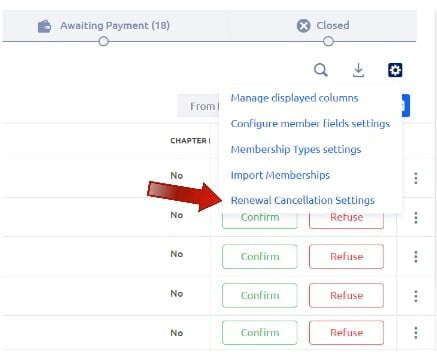
Or, open the Organization Settings menu and click "General Information" under Membership Settings, and go to the Renewal Cancellation tab.
On this page, you can the “Save & Activate” button will be greyed out if no changes have been made.
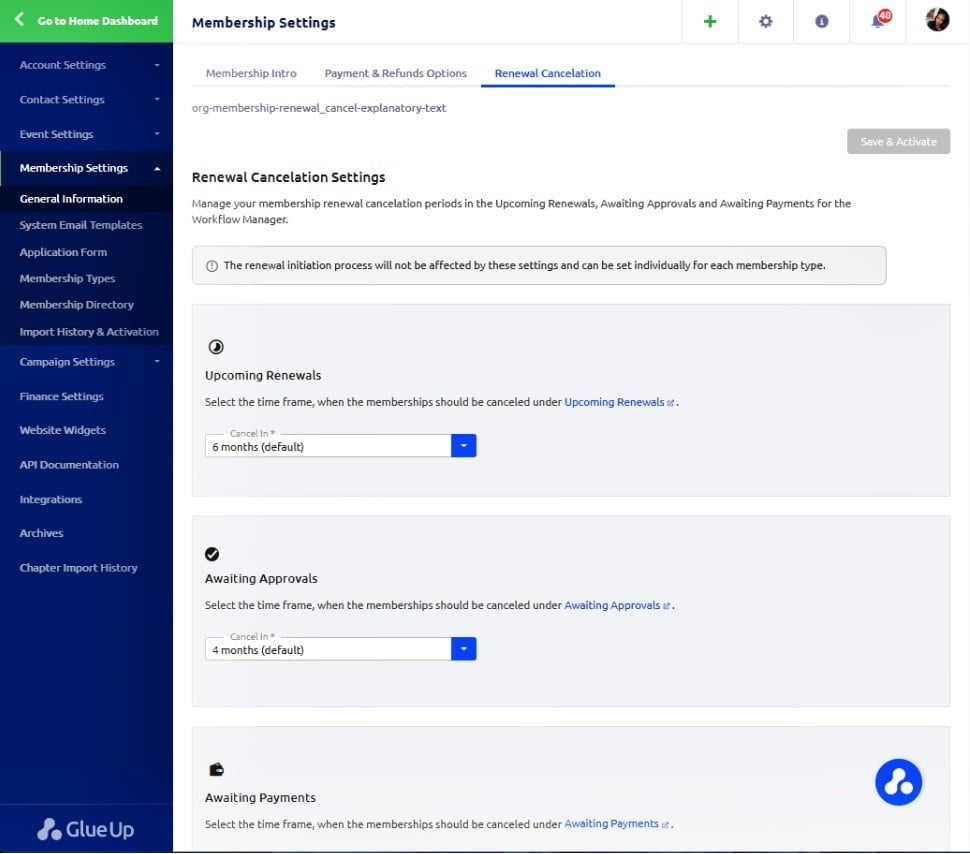
You can:
- Click on the hyperlink and will be directly taken to the Memberships > Workflow Manager to review your current members who are in the corresponding stage (Upcoming Renewals, Awaiting Approvals, and Awaiting Payments).
-
Select the time frame of cancellation.
- The options available are 1 month, 2 months, 3 months, 4 months, 5 months, 6 months (default), 7 months, 8 months, 9 months, 10 months, 11 months, 12 months, 18 months, 24 months, and Never
-
The selected time frame is calculated from the final expiration that is the end date of the membership plus grace period.
Note: The renewal initiation process will not be affected by these settings and can be set individually for each membership type.
Organization Activity Timeline
If there are any changes for the membership renewal cancellation settings, the record can be found in the Home dashboard's Organization Activity Timeline widget.